llms.txt
https://quarto.org/llms.txtquarto.org/llms.txt
quarto links
https://quarto.org/docs/websites/
https://quarto.org/docs/websites/website-navigation.html
https://quarto.org/docs/websites/website-blog.html
https://quarto.org/docs/websites/website-drafts.html
https://quarto.org/docs/websites/website-search.html
https://quarto.org/docs/websites/website-tools.html
https://quarto.org/docs/websites/website-llms.html
https://quarto.org/docs/websites/website-about.html
https://quarto.org/docs/websites/website-listings.html
https://quarto.org/docs/websites/website-listings-custom.html

https://quarto.org/llms.txt
内容
qmd 例子
---
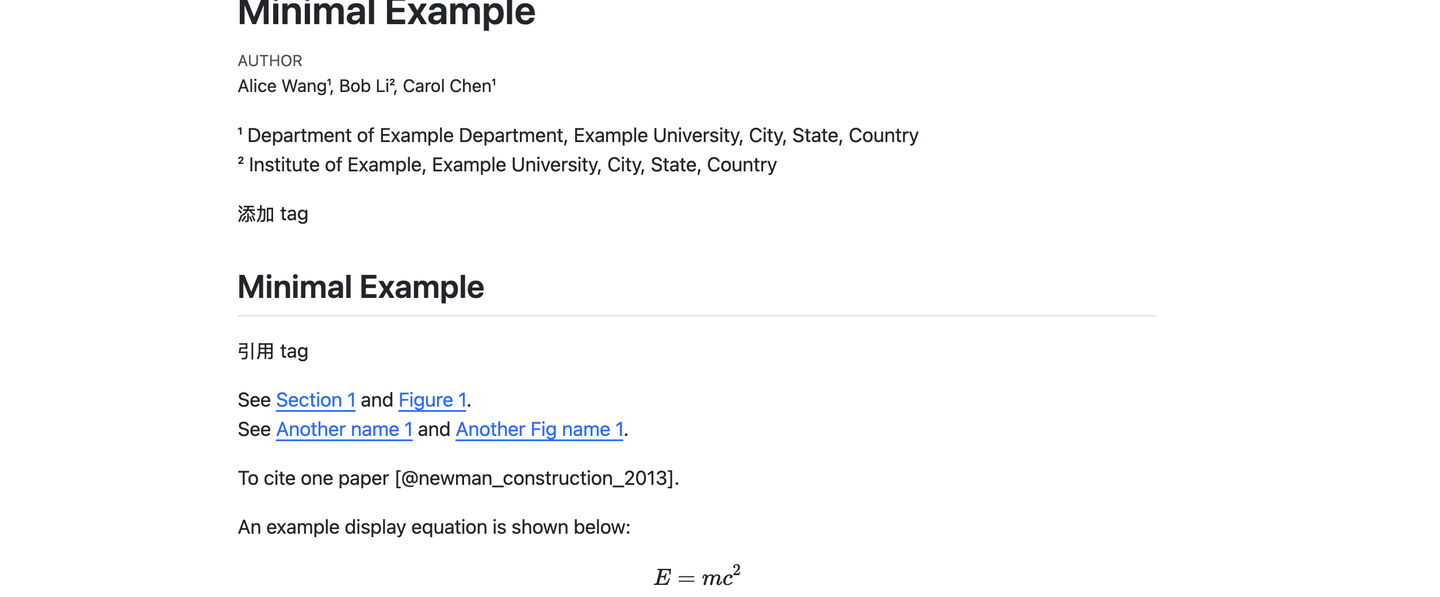
title: "Minimal Example"
author: "Alice Wang¹, Bob Li², Carol Chen¹"
bibliography: ref.bib
link-citations: true
anchor-sections: true
toc-title: Contents
format: html
---
¹ Department of Example Department, Example University, City, State, Country\
² Institute of Example, Example University, City, State, Country
添加 tag
## Minimal Example {#sec-minimal-example}
引用 tag
See @sec-minimal-example and @fig-result.
See [Another name @sec-minimal-example] and [Another Fig name @fig-result].
添加引用
To cite one paper [@newman_construction_2013].
用 equation
An example display equation is shown below:
$$
E = mc^2
$$
添加图片,[]里放 caption(但不放 Fig-1:,因为会自动加上),()里放图片路径,{}用来添加 tag
{#fig-result width=75%}
## References
添加.bib 就可以让 citation 正常显示了

上面的例子里放了 ## References ,也可以是别的level heading,比如#或者###,反正detect 到 Referencs 这个词会自动在后面添加 bibliography.
添加tag
添加 tag 用{#tag},引用就用@
@method
[Method @method]

## Method {#method}

This is the method section.
添加 figure

调整大小
{ width=70% }
给图片添加 tag用{#fig-tag},后面可以用@fig-tag 跳过来,可以直接用@tag,也可以用[name @tag]的格式(当需要重命名文中这个 figure 的时候,但是后面的数字总是会跟着)
{#fig-result width=75%}
As shown in [Fig. 1 @fig-result], the image is included below.
添加 link
[paper](http://....)
添加equation
inline行内:
$a^2+b^2=c^2$
单行居中:
$$
E = mc^2
$$
多行对齐:
$$
\begin{aligned}
f(x) &= x^2 + 1 \\
g(x) &= 2x + 3
\end{aligned}
$$
添加 citation
zotero 导出 bib 文件。
打开 zotero,在左侧的 sidebar 里,右键要导出的 library -->export collection,然后 format 选择 BibLaTex(第一个),然后选中 Export Notes, ok 之后选择保存位置。
在 head 里,在 bibliography 里输入bib 文件名称,然后 link-citations 为 true。
添加 citation 的时候[@citation_tag]即可。文章末尾加上#References 即可自动导出。
---
title: "My Paper"
author: "Your Name"
bibliography: refs.bib
link-citations: true
---

This is a citation [@doe2024].

You can also cite multiple papers [@doe2024; @smith2023].

## References
qmd 导出到 word/html
quarto render example.qmd --to html
quarto render example.qmd --to docx