word文档
选中字符串,然后alt+ , 之后在最右侧回车即可
jupyter code cell
jupyter notebook里display latex, 可以用 $$ 来包含公式,$$ 会新开启一行。
方法一:同一行的话用( ..)就不管用,用单个$即可
方法二:也可以在code cell 里添加%%latex 就可以让( ..) work了
[reference link, examples](https://nbviewer.org/github/ipython/ipython/blob/2.x/examples/Notebook/Display System.ipynb#LaTeX)
format
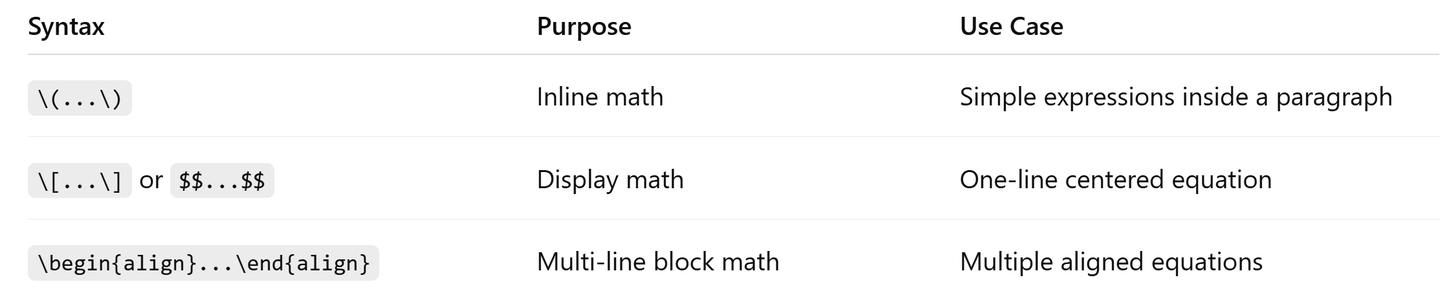
添加图片注释,不超过 140 字(可选)
local latex
vscode+latex workshop
用 mac 的话,下载 macTex
安装好之后,在 vscode extension里安装 latex workshop。
重启 vscode。新建一个.tex 文件,然后按右上角的 play 按钮,会自动生成一系列的文件,包括 pdf
content
\input
\input{problems/p1}
可以在 problems 文件夹里添加一个 p1.tex 文件,比如
\section*{Problem 1}
State the problem here if you want (optional).

\subsection*{Solution}
Write your solution clearly.
session title
from big to small
\part
\chapter
\section
\subsection
\subsubsection
\paragraph
\subparagraph
ident
section 后的第一行 text 默认不缩进(not indent),如果想要第一行缩进,可以
\usepackage{indentfirst}
for loop
\usepackage{pgffor}

\foreach \i in {1,...,10} {
  \input{problems/p\i}
}
example
\documentclass[11pt]{article}

% Packages
\usepackage{amsmath, amssymb}
\usepackage{geometry}
\usepackage{indentfirst}
\geometry{margin=1in}

% Title info
\title{Problem Set 0}
\author{Li Cai}
\date{\today}

\begin{document}

\maketitle

\section*{Multiple Choice Question}
\input{problems/p1}
\input{problems/p2}
\input{problems/p3}
\input{problems/p4}
\input{problems/p5}
\input{problems/p6}
\input{problems/p7}

\end{document}
然后在同一个目录下建一个 problems 文件夹
然后 p1-p7.tex
文件内容类似下面这样
\subsection*{1. True}

We compute the expected payout of the bet. Since the dice is fair,
\[
P(x=1)=\frac{1}{6}, \quad P(x\neq 1)=\frac{5}{6}.
\]

Since the expected payout is positive, this is a good bet and we are expected to make money.