安装gh
(type -p wget >/dev/null || (sudo apt update && sudo apt install wget -y)) \
	&& sudo mkdir -p -m 755 /etc/apt/keyrings \
	&& out=$(mktemp) && wget -nv -O$out https://cli.github.com/packages/githubcli-archive-keyring.gpg \
	&& cat $out | sudo tee /etc/apt/keyrings/githubcli-archive-keyring.gpg > /dev/null \
	&& sudo chmod go+r /etc/apt/keyrings/githubcli-archive-keyring.gpg \
	&& sudo mkdir -p -m 755 /etc/apt/sources.list.d \
	&& echo "deb [arch=$(dpkg --print-architecture) signed-by=/etc/apt/keyrings/githubcli-archive-keyring.gpg] https://cli.github.com/packages stable main" | sudo tee /etc/apt/sources.list.d/github-cli.list > /dev/null \
	&& sudo apt update \
	&& sudo apt install gh -y
后续update
sudo apt update
sudo apt install gh
create new repo
gh repo create

添加图片注释,不超过 140 字(可选)
git commit -am
相当于git add -U 和git commit -m "messages"
只会stage那些modified和deleted文件,而不会去管新增加的文件
拉下来全部覆盖local
# Fetch the latest state of the remote
git fetch origin

# Reset your local main branch to match the remote's main branch
git reset --hard origin/main
rebase
一个人的repo可以直接git pull,很方便。但是多人工作的时候有的时候会导致自己的版本不是最新的。
这个时候用git pull, 再git push, 会导致commits history很复杂。
为了保证history是线性的
git pull origin main --rebase
再push
git push -u origin main
git结构图
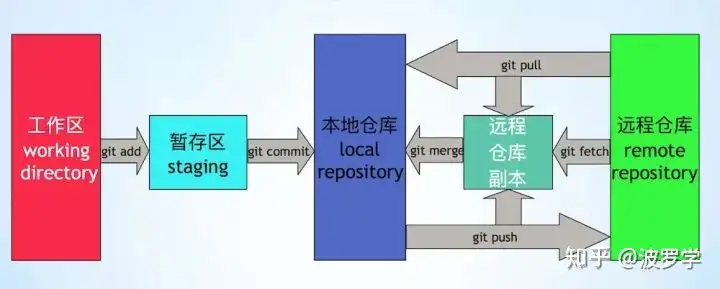
添加图片注释,不超过 140 字(可选)
git status
查看staged
git log
查看最近committed的
git log --oneline
添加remote
添加完SSH后,如果不是git clone的repo,需要手动添加remote
git remote set-url origin git@github.com:username/repo.git
查看是否添加成功
git remote -v
push 覆盖掉原来的
git push -u origin main
-u 只需要用一次,是 --set-upstream 的缩写,用来告诉upstream的是origin
main是local的
方法二添加remote (不推荐)
git remote add origin https://github.com/username/repo.git
不用SSH,而是需要配合输入用户名和密码,密码是Personal Access Token (PAT):
GitHub → Settings → Developer settings → Personal access tokens。
设置SSH
很多时候自己的private repository需要clone,需要先设置ssh。
在本机的terminal中输入
ssh-keygen -t ed25519 -C "your_email@example.com"
-t 是type, 密钥类型为 ed25519(相比 RSA 更安全、更短)
之后直接回车,默认保存在~/.ssh/id_ed25519
如果有设置密码提示,直接回车可以避免设置密码。
.ssh文件夹里还有一个public密钥,id_ed25519.pub,想象成一个锁
查看公共密钥
cat ~/.ssh/id_ed25519.pub
把显示的内容(所有的,包括前面的名称,和后面的邮箱地址) 复制在:
GitHub → Settings → SSH and GPG keys → New SSH key,在key里面paste即可。
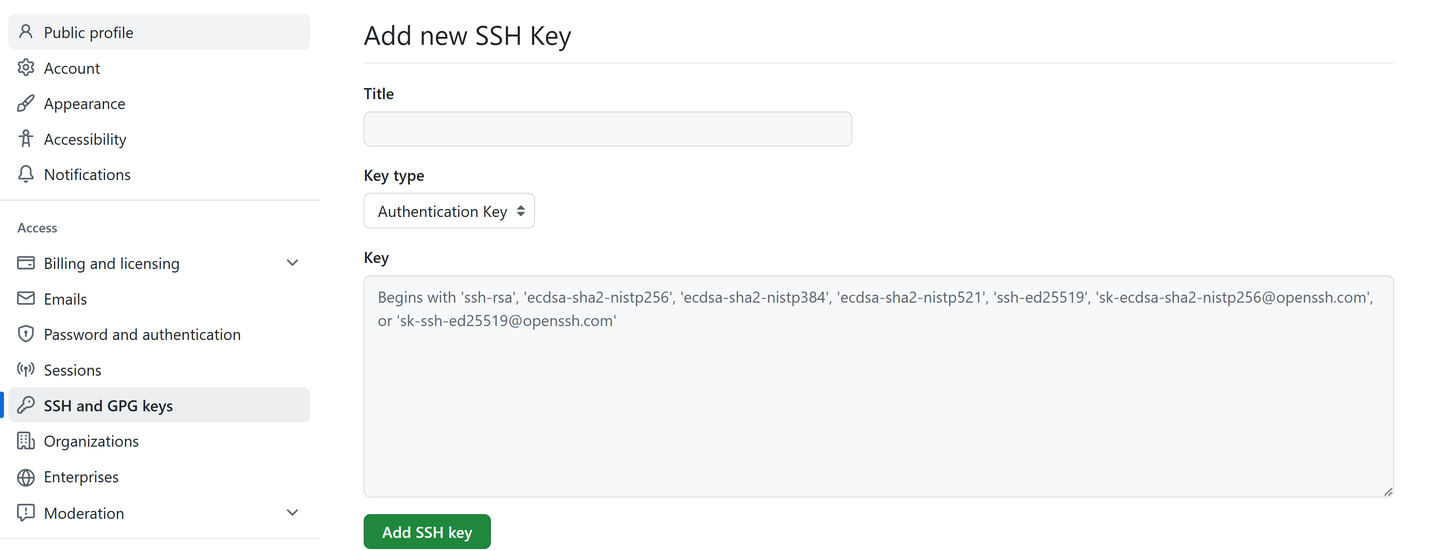
添加图片注释,不超过 140 字(可选)
测试连接
ssh -T git@github.com
Course
fetch 和pull的区别
fetch只是会download一些新的commits,但并不会更改本地的file
pull是fetch和merge的结合,会直接更新到最新版。
输入个人信息
git config --global user.name "Your Name"
git config --global user.email "your.email@example.com"
撤回commit
git reset --soft HEAD^
Pull Request
Fork public repository to your repository --> git clone --> git branch sdf (new branch name)--> git checkout sdf --> git commit --> git push sdf --> click 1 commit ahead in git page --> create pull request
Branch
查看branch
git branch
switch branch
git checkout branchname
和original repository同步
Fetch with upstream
查看remote
git remote -v #v可以显示git link
如果没有upstream,添加
git remote add upstream gitlink
fetch
git fetch upstream
vscode source control里右上角 的...,然后点击fetch,选择upstream
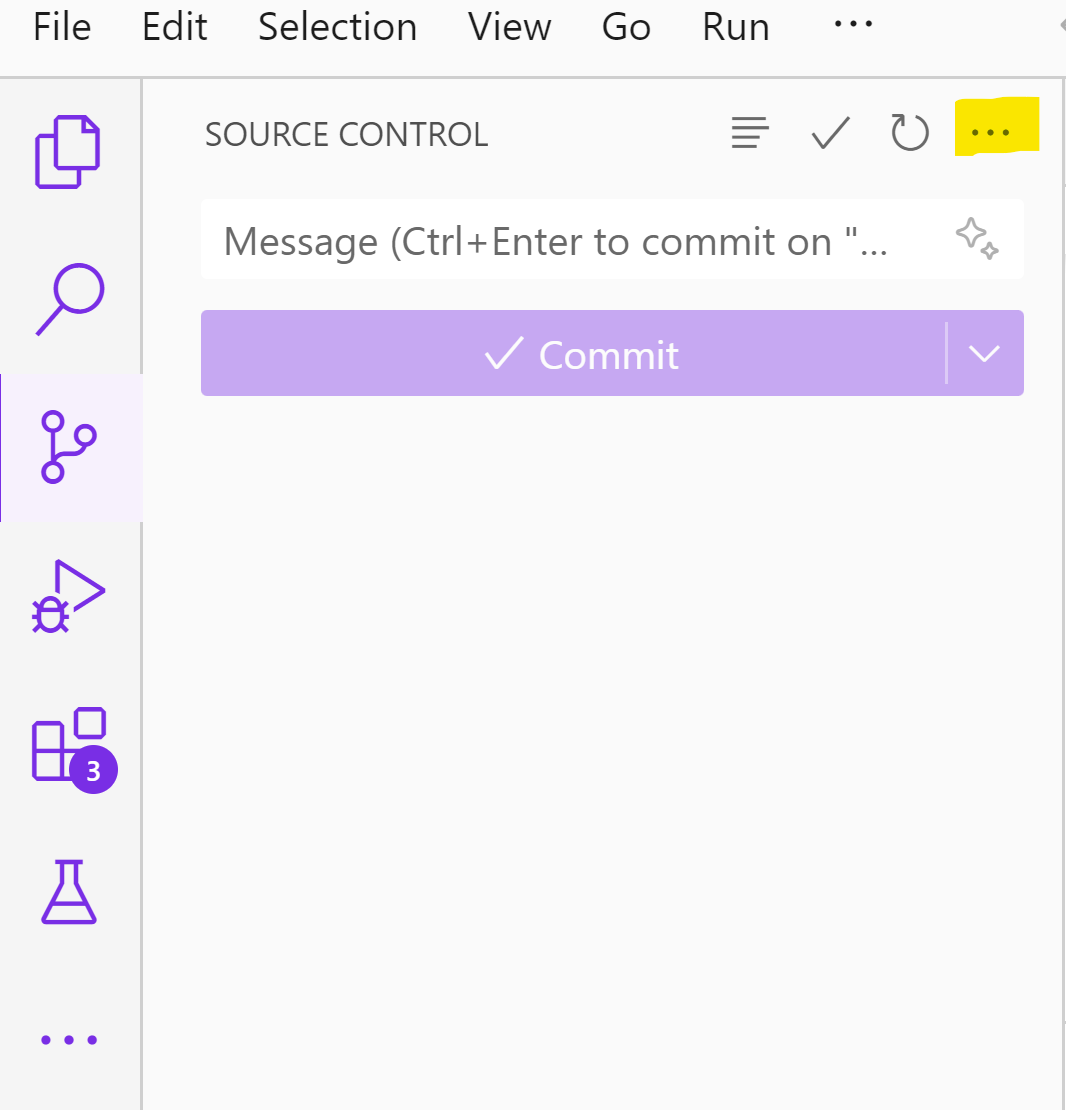
添加图片注释,不超过 140 字(可选)
merge with current branch
git merge upstream/main